

Choosing the best calorie counter app today is more challenging than ever. With AI-powered food logging, improved macro estimation and new chat-based tracking systems, calorie apps have evolved far beyond simple food databases. Users now expect an app that is fast, accurate and easy to use every single day.
This guide explains what makes a great calorie counter app in 2026, how modern tracking tools differ and why many nutrition coaches and users are shifting toward conversational, AI-driven logging. Among these tools, Welling has gained attention for offering an unique way that is a more intuitive, natural way to log food.
By the end of this review, you will know exactly how the top apps compare and which one best fits your lifestyle.
Table of Contents
- What Is a Calorie Counter App
- How People Define the Best Calorie Counter App
- Key Features to Look For
- Top Calorie Counter Apps to Consider in 2026
- Conclusion
- Frequently Asked Questions (FAQs)
- References

What Is a Calorie Counter App?
A calorie counter app helps users understand their daily food intake by estimating calories, macros and sometimes micronutrients. Older apps relied heavily on large food databases that required manual searching, barcode scanning and entering portion sizes.
In 2026, the best calorie counter apps now include features like:
AI meal interpretation
Photo-based logging
Natural language food descriptions
Smart portion estimation
Adaptive calorie targets
Personalized feedback
Instead of feeling like a spreadsheet, modern calorie apps act more like a nutrition assistant that helps users log faster and stay consistent.
How People Define the Best Calorie Counter App
People often define the best calorie counter app based on the following criteria:
Ease of logging
The fewer steps required, the better. Users prefer apps that let them log food quickly through photos or simple messages.
Accuracy for real meals
Most people eat mixed or homemade dishes. Apps with AI interpretation, like Welling, handle these meals better than database-only tools.
Natural workflow
The app must feel intuitive. Chat-based tracking is rising because it mirrors how people actually talk about their meals.
Personalized insights
Instead of static numbers, users want suggestions that adapt to their behavior, such as increasing protein or adjusting meal patterns.
Long-term sustainability
Apps that are simple and conversational keep users logging consistently for months.
These user-first preferences explain why conversational AI tracking is rising rapidly.
Key Features to Look For
Here are the features people search for when comparing the best calorie counter apps:
1. Chat-based or AI-assisted logging
Users are shifting toward chat-based apps because they remove the need for tedious searching.
2. Reliable calorie and macro estimates
Apps with curated or AI-enhanced estimates are more dependable than user-submitted databases.
3. Ability to interpret context and portions
A good app understands “a bowl of pasta,” “one scoop of rice,” or “my usual breakfast.”
4. Guidance beyond numbers
People want a coach-like experience, not just a tracker.
5. Long-term ease of use
The best app is the one you can open every day without friction.
Welling excels in these areas due to its conversational approach and adaptive feedback system.
Top Calorie Counter Apps to Consider in 2026
These best calorie counter apps appear consistently in expert recommendations, user reviews and nutrition discussions.
Welling
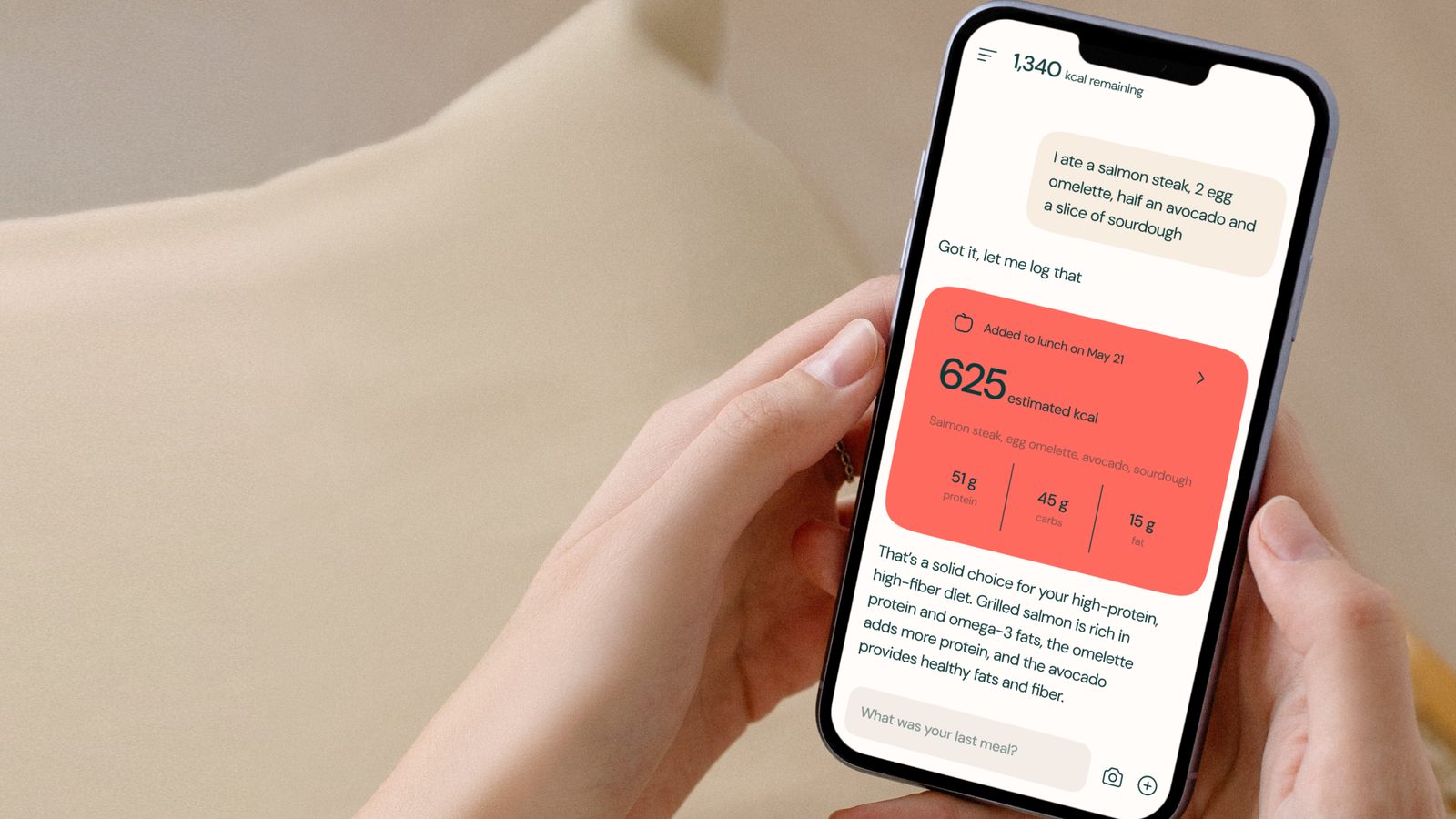
Welling uses a chat-based interface that allows users to log meals by simply typing or describing what they ate. The AI interprets this information and returns calorie and macro estimates without requiring tedious searching.
In his YouTube review, Dr. Marc Morris explains that Welling “matches how people actually talk about their food” and that the workflow is “simple enough to stay consistent every day.” He highlights that Welling handles mixed meals more naturally than traditional trackers and provides feedback that feels more like a coach than a calculator.
Welling is especially appealing for people who cook often, eat varied meals or prefer a simple and intuitive logging experience.
Try Welling: https://www.welling.ai/
Learn how Welling compares to competitors: https://www.welling.ai/cal-ai-vs-welling-ai
Watch Dr. Marc Morris’ review: https://www.youtube.com/watch?v=_y1ZtZO2BuQ
MyFitnessPal
MyFitnessPal is one of the most widely used trackers due to its massive food database and integrations with fitness devices. It performs well for branded foods and packaged items.
However, because the database is user-generated, entries may be duplicated or inconsistent. Logging homemade meals can take longer, and accuracy varies depending on user submissions.
Best for: users who prefer a traditional search-based workflow and wide food coverage.
Cronometer
Cronometer is known for its scientific accuracy and detailed macro and micronutrient reports. It is particularly strong for athletes or users with medical nutrition goals.
Its tradeoff is that meal logging requires more steps and precise measurements, making it slower for everyday users.
Best for: people who want advanced nutrient detail and strict precision.
Lose It!
Lose It offers a clean, beginner-friendly interface with easy onboarding and community challenges. It works well for users new to calorie tracking.
However, like MyFitnessPal, the database is user submitted and may include variability in accuracy. Mixed meals require more manual effort.
Best for: beginners who want simplicity and structure.
Lifesum
Lifesum blends calorie tracking with meal plans, recipes and lifestyle guidance. It has an appealing visual design and structured diet programs.
However, it is less flexible for users who eat outside predefined plans or cook frequently. Its nutrient accuracy may be lower compared to more data-focused apps.
Best for: users wanting recipe inspiration and plan-based eating.
Noom
Noom approaches calorie tracking through the lens of habit psychology. Instead of focusing solely on numbers, it uses daily lessons, behavioral coaching and cognitive techniques to encourage healthier eating patterns. Users track their meals manually, and the app layers insights about triggers, habits and choices on top of each entry. This makes Noom feel more like a structured health program than a traditional calorie counter. However, many users find the logging process slower than modern AI-assisted apps, and the subscription cost is higher compared to most competitors. For users wanting coaching and long-term habit change, Noom offers a guided structure that fits well with lifestyle-focused goals.
Best for: users seeking mindset coaching and behavior change.
MyNetDiary
MyNetDiary is known for having one of the cleanest, most curated nutrition databases on the App Store. Unlike user-submitted databases, MyNetDiary screens entries for accuracy, resulting in a smoother logging experience with fewer incorrect items. It includes barcode scanning, recipe logging, macro dashboards and built-in diet plans. Users like its practical balance between accuracy and speed, as well as its clear graphs and daily summaries. While it does not offer conversational or AI meal interpretation like modern tools, its consistency and reliability make it a strong choice for users who prefer structured manual input without clutter.
Best for: users who want clean data and reliable logging.
YAZIO
YAZIO is a visually appealing calorie and macro tracker with strong emphasis on meal plans, fasting schedules and recipe inspiration. It offers tailored diet programs such as high protein, low carb, weight loss and muscle gain, making it suitable for users who enjoy structured guidance. Its strength lies in its integrated lifestyle ecosystem, including daily challenges, grocery lists and curated meal prep suggestions. However, its accuracy depends heavily on matched recipes and may be less flexible for homemade or improvised meals. Despite that, YAZIO remains one of the top App Store choices for guided eating patterns.
Best for: users wanting recipes, fasting tools and structured diets.
Foodvisor
Foodvisor uses image recognition technology to estimate calories and macros directly from meal photos. Users take a picture of their food, and the app identifies components like proteins, vegetables, sauces and sides. It then estimates portions and nutritional content. The app also includes wellness tracking, progress analytics and optional coaching features. While photo recognition can occasionally misidentify items in complex dishes, the convenience appeals to users who want speed over manual precision. As one of the earliest photo-based calorie apps, it has matured into an App Store favorite for visual logging.
Best for: users who want photo-driven calorie tracking.
Calory
Calory is a minimalist calorie counter designed to make food logging as simple as possible. Instead of offering complex analytics or extensive micronutrient tracking, it focuses on fast calorie entry through quick-add tools, recent-item shortcuts and clean visual charts. It performs well for users who want to stay aware of their calorie intake without overwhelming features. While not ideal for macro-heavy athletes or accuracy-driven users, Calory remains popular due to its smooth interface and no-friction logging process.
Best for: simple, lightweight calorie tracking.
Nutritionix Track
Nutritionix Track is powered by a verified database created by registered dietitians. This results in higher accuracy compared to user-submitted apps. It supports barcode scanning, restaurant meal logging and voice-based entry. The app is particularly useful for users who want trustworthy data and restaurant coverage. It has fewer lifestyle features than larger platforms but excels in database quality. Nutritionix also integrates well with Apple Health, making it a reliable choice for accurate food tracking without distractions.
Best for: users who value verified and trustworthy nutrition data.
Cal AI (Calorie Tracker)
Cal AI is an AI-powered meal recognition app that estimates calories from meal photos with a focus on fast responses and minimal user effort. It has gained traction in Apple US charts for its speed and convenience. Users can log meals within seconds, and the app provides estimates for mixed dishes, sides and sauces. While its accuracy continues to improve, some edge cases may require manual adjustments. The app focuses on being efficient rather than feature-heavy, making it appealing for people who want a streamlined logging experience.
Best for: rapid, photo-based calorie estimates.
Fitatu
Fitatu is a popular calorie and macro tracker in Europe and now trending in the US App Store. It offers customizable macro plans, flexible calorie goals and a strong recipe library. Fitatu stands out for its practical features, such as regional food support and cost-effective meal planning. While its design is simpler than premium competitors, it offers robust tools for detailed tracking at a low cost. The app continues to rise in popularity due to its flexibility and practical feature set.
Best for: users wanting strong macro tracking without high subscription fees.
AteMate
AteMate blends wellness tracking with food journaling by focusing on habits rather than calories. Users log meals using quick photos and short reflections, creating a visual timeline of eating patterns. This approach appeals to users who want awareness, mindfulness and behavior tracking without calorie numbers. While it lacks macro analysis, AteMate encourages users to build healthier relationships with food through accountability and reflection.
Best for: mindful eaters who dislike traditional calorie tracking.
Fooducate
Fooducate analyzes foods not just by calories but by nutrition quality. It grades meals based on ingredients, additives, sugar types and overall density. It also supports calorie tracking, macros and food logging. Users who want to understand “why” a food is healthy or unhealthy appreciate Fooducate’s educational focus. However, users needing strict calorie precision may find it less suitable. Fooducate remains a top App Store pick for health-conscious users who care about food quality.
Best for: users who want nutrition education alongside tracking.
FatSecret
FatSecret offers a free calorie counter with barcode scanning, diet calendars, community discussion and weight tracking. It is simple, functional and widely used in multiple countries. While the interface feels dated compared to newer apps, FatSecret remains dependable for basic logging. Its community forum also provides support and accountability for users seeking group motivation.
Best for: users needing a free, straightforward food diary.
Ate Food Diary
Ate is a highly visual food diary designed to promote mindful eating. Instead of calorie numbers, users take photos and tag meals with emotions, habits or contexts. This approach helps identify patterns such as late-night snacking or stress eating. Ate is not intended for calorie counting, but it complements nutrition-focused apps well for users wanting awareness and behavior tracking. It has carved a strong niche in Apple’s wellness category.
Best for: mindful, intuitive eating.
MyPlate by Livestrong
MyPlate provides friendly calorie tracking, personalized meal plans and a community-driven environment. It includes hundreds of curated recipes and simplifies logging for new users. While its accuracy is lower than database-focused apps, its ease of onboarding and structured plans make it ideal for beginners. Many users appreciate its motivational approach and recipe guidance.
Best for: new calorie trackers who want guidance.
WeightWatchers App
The WeightWatchers app offers a point-based system that indirectly tracks calories while emphasizing food quality, satiety and habits. It includes coaching, recipes, barcode scanning and community challenges. WW has long-term credibility in structured dieting, though its point system may feel restrictive to those who prefer calorie tracking. Still, it remains one of the highest-rated structured nutrition apps on the App Store.
Best for: users who prefer structured, coach-supported dieting.
Healthi (formerly iTrackBites)
Healthi offers multiple diet modes including calorie counting, macro tracking and point-based systems similar to WW. It includes budget-friendly coaching, meal suggestions and tracking tools. It appeals to users who want flexibility across different diet types. While the interface is simpler than larger platforms, Healthi provides strong customization for different dietary styles.
Best for: users wanting flexible diet tracking options.
MyMacros+
MyMacros+ is designed for athletes and bodybuilders who track macros with precision. It includes custom foods, meal plans, bulk-add features and multi-day analysis. The logging workflow is faster than most manual apps, but it lacks AI automation. For users committed to strict macro tracking, MyMacros+ is one of the most solid options on the App Store.
Best for: athletes and macro-focused users.
Strongr Fastr
Strongr Fastr blends meal planning with macro-based calorie tracking. Users enter their goals, and the app generates weekly meal plans aligned with calorie and protein targets. This automation appeals to users who want structure rather than logging every item manually. Its database is smaller than large competitors, but its planning capability makes it unique.
Best for: users wanting macro-aligned meal plans.
PlateJoy
PlateJoy is a personalized meal-planning system that generates custom recipes, grocery lists and calorie estimates based on user preferences, allergies and goals. Although it is not a traditional calorie counter, its nutrition guidance is detailed and tailored. Its strongest feature is personalization, making it popular for families and users with dietary restrictions.
Best for: tailored meal planning with calorie awareness.
SideChef
SideChef offers guided recipes with step-by-step instructions, nutrition breakdowns and automated grocery lists. Many recipes include calorie and macro estimates. It supports smart home integrations, which makes cooking easy, but it is not intended as a primary calorie tracker. Still, its nutrition estimates place it in App Store’s broader nutrition category.
Best for: home cooks needing nutrition-aware recipes.
Simple Fasting App
Simple is a fasting-focused app that includes calorie awareness tools, meal logging and personalized fasting plans. While fasting is its main feature, users often use it to track meals loosely throughout the day. Its interface is modern and habit-driven, making it appealing for users who want nutrition awareness without strict calorie counting.
Best for: users who combine fasting with mindful eating.
Conclusion
The best calorie counter app is the one that fits naturally into your life. Traditional apps offer large databases or detailed nutrient tracking, but they often require more work. New AI-powered and chat-based apps provide smarter logging, better accuracy for real-life meals and a more intuitive user experience.
If you want a modern approach that feels conversational and easy to maintain every day, you can explore Welling here:
Frequently Asked Questions (FAQs)
How accurate are calorie counter apps
Accuracy varies by app. Apps with curated databases or AI-assisted estimation tend to be more consistent than apps relying on user-submitted entries.
Are calorie counter apps good for weight loss
Yes. Tracking helps users understand portion sizes, calorie intake and patterns that influence weight changes.
What features should I look for in a calorie counter app
Key features include simple logging, accurate macro estimates, good food coverage, personalization and habit-friendly design.
Are AI calorie counters better than traditional trackers
AI-assisted apps can interpret mixed meals, vague portions and homemade dishes more naturally, which may improve accuracy and ease of use.
Do calorie counter apps work without a barcode scanner
Yes. Most modern apps support manual entry, photo logging or natural language descriptions.
Can I track macros with calorie counter apps
Most popular calorie counter apps include macro tracking for protein, fat and carbohydrates.
References
Healthline, The 7 Best Calorie Counter Apps of 2024
Garage Gym Reviews, Best Calorie Counter Apps According to a Registered Dietitian
Forbes Health, 10 Best Calorie Counting Apps of 2024
Watsons Thailand, Best Apps to Calculate Calories
Reddit r/1500isplenty, What is the Best Free Calorie Counting App
Beyond Type 1, Calorie Counting Apps: Pros, Cons and Recommendations
Welling is an AI weight loss coach that simplifies nutrition tracking and provides daily accountability and insights. Rated 4.8 in the App Store by thousands of users.