


Tracking what you eat is one of the most effective ways to improve your eating habits, manage your weight, and understand how your nutrition affects your health. Rather than loosely guessing calories or relying on memory, a reliable app to track food intake turns your nutrition into actionable data so you can see patterns, stay consistent, and reach your goals faster. However, not all tracking is created equal, logging mistakes, incomplete entries, and sloppy portion estimation can mislead your insights and derail progress.
This guide covers how to track food intake accurately using modern apps, what features matter most, data-backed tips to reduce errors, and how to turn your tracking into effective habits.
Table of Contents
- Why Tracking Food Intake Matters
- Choosing an App to Track Food Intake
- Core Logging Tips for Accuracy
- How to Track Calories More Precisely
- Advanced Logging Techniques
- How AI and Automation Improve Logging
- How to Avoid Common Logging Mistakes
- Frequently Asked Questions
Why Tracking Food Intake Matters
Keeping a record of what you eat does more than help you count calories. Logging your food intake:
Increases awareness of eating habits and portion sizes
Helps identify hidden calories (dressings, oils, snacks)
Shows patterns of cravings or timing that influence weight
Supports behavior change through consistent self-monitoring
Research shows that individuals who consistently log their food tend to have better weight management outcomes than those who do not track. Smartphone diet tracking apps help users monitor calories, dietary patterns, and nutritional intake, and they may contribute to healthier eating choices over time.
Choosing an App to Track Food Intake
When selecting an app to track food intake, consider features that support accurate logging:
Food Database Quality
A food database should include verified entries preferably from sources aligned with national nutrition data so that the calories and macronutrient values are reliable. Apps like Cronometer are known for having detailed databases that go beyond simple calorie counting.
Ease of Logging
Simple logging workflows reduce skipped meals. Tools that let you scan barcodes, search quickly, or copy past meals save time and reduce errors.
Macro and Micro Tracking
Apps that also break down macronutrients (protein, carbs, fats) can give you deeper insight into the quality of your intake, not just the calories.
Syncing and Integration
If you also use fitness trackers or smartwatches, an app that syncs with other devices can provide a holistic picture of energy balance and physical activity.
Popular choices include:
Cronometer (verified nutrient database)
MyFitnessPal (large crowdsourced database)
MyNetDiary (extensive food entries and macros)
Lifesum (personalized recommendations and meal plans)
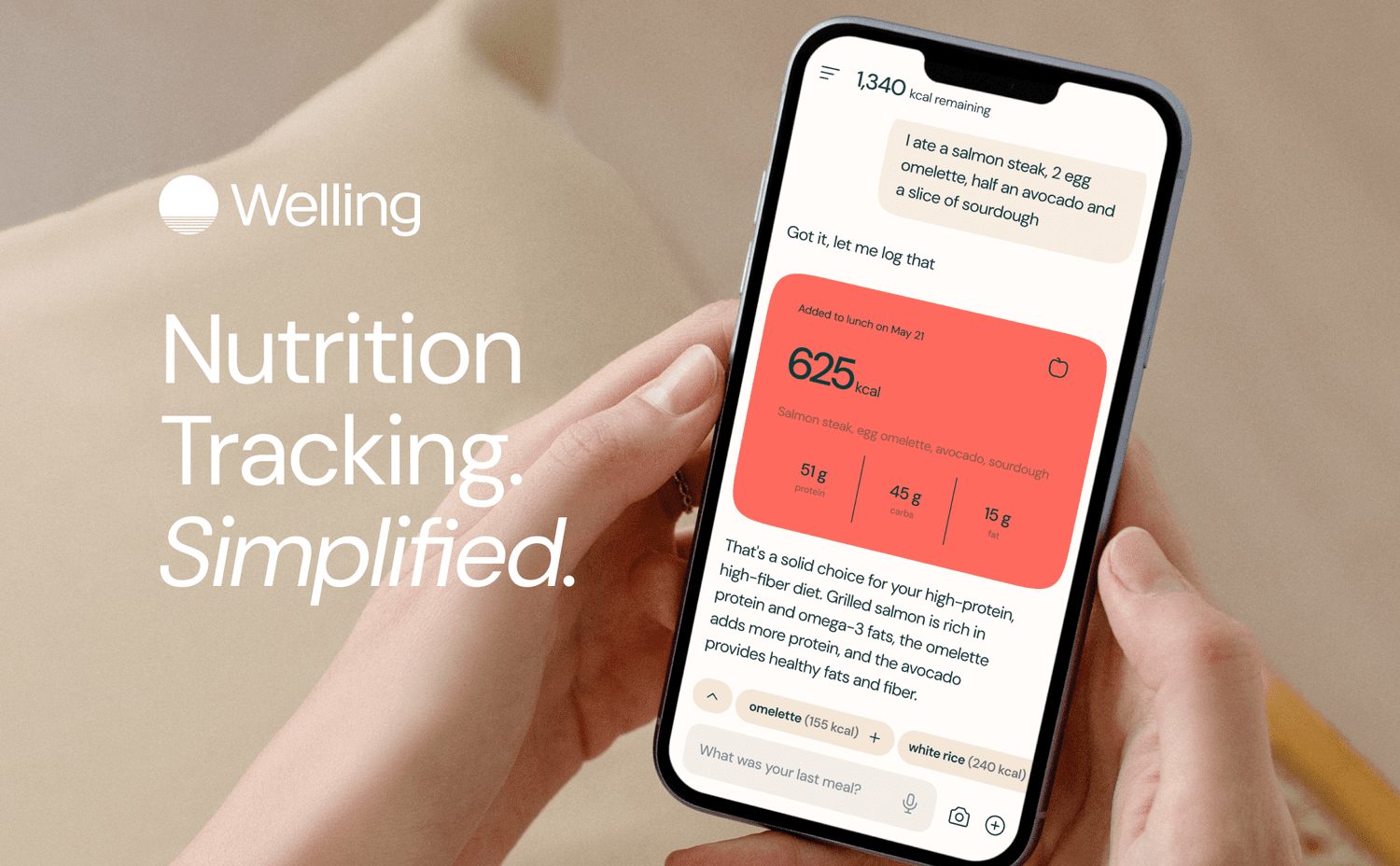
And modern AI-assisted tools like the Welling app that make logging faster and more intuitive (user experience).
Core Logging Tips for Accuracy
Accurate food logging isn’t just about choosing the right app. It’s about how you use it. Here are core strategies to capture your intake correctly:
Log Every Meal Immediately
Logging in real time prevents forgotten items and ensures you record details while they are fresh.
Be Honest with Portions
Eyeballing portions often leads to under or overestimation. When possible, weigh food with a kitchen scale.
Include Condiments and Add-Ons
These small items; sauces, oils, dressings, can add significant calories if left unlogged.
Use Barcode Scanning
A reliable barcode scan pulls verified nutrition data quickly and removes guesswork.
Save Frequent Foods
If you eat similar meals often, save them in the app to log in one tap.
How to Track Calories More Precisely
If calorie awareness is your priority, these tactics help ensure your logging is closer to reality:
Weigh Foods When Possible
A food scale gives the most precise measure of portion size especially for items without standard serving sizes.
Check Database Verification
When your app shows multiple entries for a food, choose entries marked as “verified” or reviewed. These tend to reflect more accurate nutrition values.
Adjust Portions Rather Than Serving
If your meal deviates from listed serving sizes, manually adjust grams or ounces instead of relying on rough categories like small/medium/large.
Cross Reference Common Foods
For complex or mixed meals, check similar entries in more than one database or app to confirm values.
Advanced Logging Techniques
For people who want deeper insight into eating habits:
Track Macros and More
Log macronutrients and micronutrients to understand quality of intake, not just calories.
Use an AI Assistant
AI-powered logging and analysis features can help you accurately capture meals using photos, text descriptions, or voice. These reduce manual effort and increase consistency by cutting out common user errors.
Use Predictive Tools
Some apps suggest entries based on your pattern (e.g., logging the same breakfast regularly), which speeds up and refines food entry.
How AI and Automation Improve Logging
Modern food intake apps increasingly offer features that make logging easier and more accurate:
Photo Recognition
Take a picture of your meal, and the app suggests likely matches and calorie estimates based on AI food recognition.
Text and Voice Entry
Describe your meal in plain language or dictate it. AI interprets the description and logs nutrition for you.
Smart Suggestions
Apps learn your eating patterns and prefill common meals so you don’t have to search repeatedly.
These tools reduce friction, boost consistency, and often result in better long-term tracking accuracy than manual text entry alone.
Apps like Welling that incorporate smart logging along with supportive habit prompts and diet analysis help users track intake more consistently with less effort (user-reported feedback and feature overview).
How to Avoid Common Logging Mistakes
Even experienced trackers fall into traps. Avoid these frequent errors:
Not Logging Snacks
It’s easy to log main meals but forget snacks. These can add up quickly. Set reminders to log all eating occasions.
Only Logging “Good Days”
Some people track only when they eat well. For meaningful insight, track all meals, patterns emerge over time.
Assuming Labels Are Always Exact
Food labels round values; be aware they may not reflect exact calories or macronutrients.
Overlooking Drinks
Beverages like smoothies, alcohol, and coffee add calories, include them.
Frequently Asked Questions
What is the best app to track food intake
There is no one perfect app. Choose based on what you value: verified data, ease of use, AI features, or detailed nutrient tracking.
Are free food tracking apps worthwhile
Yes. Many free options provide calorie and nutrient tracking. Premium often adds automation and deeper insights.
How accurate are food logging apps
Accuracy varies with portion estimation, data sources, and how diligently you log. A combination of good logging habits and app features improves results.
Do apps help with weight loss
Research suggests consistent self-monitoring through apps is associated with improved dietary choices and weight outcomes.
References
Best Calorie Counter Apps from Healthline https://www.healthline.com/nutrition/best-calorie-counters
Top Nutrition Tracking Apps https://fitia.app/learn/article/top-12-nutrition-tracking-apps-2026/
Cronometer Nutrition Tracking App https://cronometer.com/index.html
MyNetDiary Food and Nutrient Tracker https://www.mynetdiary.com/
Guide to Food Logging Accuracy https://caliberstrong.com/blog/food-logging/
Research on Diet Tracking App Functionality https://www.ncbi.nlm.nih.gov/pmc/articles/PMC6543803/
Lifesum Healthy Eating App https://lifesum.com/
AI Calorie Tracking Apps Guide https://nutriscan.app/blog/posts/best-free-ai-calorie-tracking-apps-2025-bd41261e7d
Simple Logging Tips https://www.cspi.org/article/our-guide-food-tracking-apps
Welling is an AI weight loss coach that simplifies nutrition tracking and provides daily accountability and insights. Rated 4.8 in the App Store by thousands of users.