
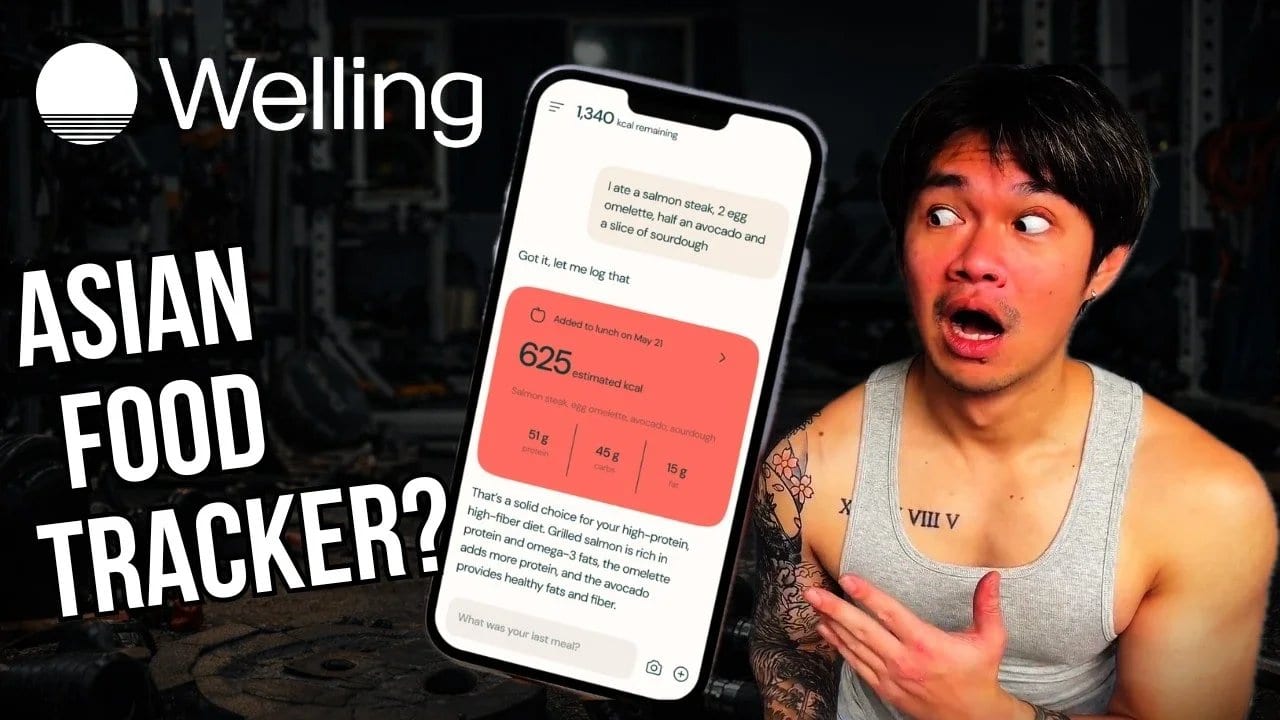
Best Calorie Tracker for Asia? Welling
Review Published: 2026 | Review by: Kevin, Home Gym Gainz | Watch time: 13:49
Quick Overview
In this personal and honest review, Kevin from Home Gym Gainz documents his 2026 cut using Welling while living in Osaka, Japan as a father of two with a full-time job. He puts the app through what he calls the Japan test, logging everything from convenience store bentos to McDonald’s Japan to yakiniku beef cuts, and shares both the pros and the cons after four weeks of real daily use.
His verdict: Yes, he would keep using Welling beyond the sponsorship. The Japanese and Asian food database alone puts it ahead of every other calorie tracker he has tried, and the low-friction logging keeps him consistent in a life that has very little room for extra effort.
Key Moments
0:00 - Introduction: Getting back to 15% body fat with a completely different life
0:49 - What is Welling: ChatGPT meets MyFitnessPal for calorie and macro tracking
1:06 - Onboarding deep dive: Allergies, diet preferences and dietician notes
1:40 - Dairy sensitivity feature: A small detail with a big impact on daily tracking
2:04 - The Japan test: Logging Japanese and Asian food across three accuracy levels
3:38 - McDonald’s Japan accuracy test: How well does the AI food tracker handle local menus?
3:54 - Pros: Asian food database, AI nutrition coaching, low friction logging and Garmin sync
5:53 - Cons: Barcode scanning inconsistency and initial calorie recommendation
7:52 - Bottom line and tips for getting the most out of Welling
8:13 - Five tips for maximizing your results with Welling as a daily calorie tracking app
11:45 - Four-week verdict: Would Kevin keep using Welling after the sponsorship ends?
Kevin from Home Gym Gainz opens his review with a premise that will resonate with a lot of people.
In his late twenties, he got to 15% body fat. No kids, no competing demands, all the time he needed. Fast forward to nearly 35: two kids, a full-time job, and life in Osaka, Japan. Somewhere between the late nights and family dinners, the progress slipped away.
The goal is the same. The life is completely different. And Welling is the tool he is betting on to close that gap.
After four weeks of daily use logging Japanese convenience store meals, restaurant food, home-cooked dinners, and McDonald’s Japan, his conclusion is clear: the app earns its place, not because it is perfect, but because it makes consistency possible for someone who cannot afford to make calorie tracking complicated.
What Is Welling?
[Watch: 0:49]
Kevin describes Welling the same way the app describes itself: ChatGPT meets MyFitnessPal. Instead of manually searching a food database for every ingredient, the main screen is a chat window. You tell it what you ate, take a photo, or describe your meal, and the app handles the rest including logging it to the right meal slot and updating your calories and macros automatically.
What sets the onboarding apart is how far it goes beyond the basics. Most calorie tracking apps ask for age, weight, and goal and move on. Welling asks about allergies, foods you dislike, dietary restrictions, and nine different diet preferences ranging from keto to Mediterranean to low carb. You can even add dietician notes or previous health test results, so if you are managing something specific like PCOS or trying to cut down on sodium after a doctor visit, the AI already knows before you have logged a single meal.
Kevin added that he is sensitive to dairy. From that point forward, every time he logged a latte or a milk-heavy smoothie, the app reminded him to watch his intake. A small feature, but one that made the experience feel like actual coaching rather than generic tracking.
The Japan Test
[Watch: 2:04]
This is where Kevin’s review gets specific in a way most Welling reviews cannot. Living in Japan means eating Japanese food daily, and anyone who has tried tracking Japanese meals on a mainstream calorie app knows the problem. Half the food is missing from the database entirely, and the other half has incorrect macros.
Kevin ran Welling through three levels of accuracy to see how it handled the challenge.
At the lazy end, he typed a simple description: a bowl of chicken breast and Japanese rice. The app returned an instant estimate, good enough for a baseline. Moving up a level, he took a photo of a convenience store meal and described what he ate. The macros adjusted to reflect his description. At the most detailed level, he used a kitchen scale, logged exact ingredient weights, and described everything. At that point, he considers the result as close to 100% accurate as a calorie tracking app can get.
His favorite test was the most realistic one. He grabbed a bento from a grocery store, sat down at work, and took a photo. When a barcode was available, he scanned it. When the barcode did not work, the app asked him to photograph the Japanese nutrition label. Within seconds, all the nutritional information was populated without any manual entry or custom food creation. For someone who previously had to build custom food entries from scratch for Japanese meals in other apps, that result was genuinely impressive.
McDonald’s Japan Accuracy Test
[Watch: 3:38]
He also tested McDonald’s Japan and found the accuracy to be very close to 100%. For anyone eating Asian food as part of their daily life, he considers this alone enough to put Welling ahead of every other calorie tracker he has used.
Pros
[Watch: 3:54]
Asian food database
Kevin leads with the Asian and Japanese food database, which he calls genuinely impressive after four weeks of real testing. For anyone living in Asia or eating Asian food regularly, this is the single biggest advantage Welling has over mainstream calorie counter apps like MyFitnessPal.
Three levels of food logging
The three-level logging system is a practical strength: lazy mode via voice or text, mid-level with a photo, and detailed mode with a photo plus description plus measurements. Each level adds accuracy, and the ability to choose based on your situation means you can log quickly when you are out with family and go deeper when you have time at home.
AI nutrition coaching tone
The AI coaching feels supportive and non-judgmental, which Kevin returns to several times. Low friction means you actually stay consistent, he says, and that is the whole game.
Garmin and Apple Health sync
Garmin integration through Apple Health is a practical win. Workout data and step counts sync automatically, burned calories get added to his daily total, and the app even recommends not relying too heavily on the burn number when setting your calorie target. Kevin appreciates that as genuinely sensible advice.
Dairy sensitivity reminder and contextual coaching
The dairy sensitivity reminder stood out as a feature that made the app feel more human. When he asked the AI for snack suggestions, it came back with edamame, complete with calories, macros, and a texture description. He suspects the recommendation was shaped by his location and logged food history, and if that is true, it reflects a level of contextual awareness that no generic calorie tracker can replicate.
Recipe paste feature
He also highlights a feature he had not seen in other apps: the ability to paste a recipe directly into the chat and receive a full calorie and macro breakdown per serving. For home cooking, that is a significant time saver.
Cons
[Watch: 5:53]
Kevin is direct about what does not work.
Barcode scanning inconsistency
Barcode scanning is hit or miss. Sometimes it finds the food immediately. Other times it asks you to photograph the label, and if that fails too, you end up entering the details manually, which puts it on the same level as any other app. Scanned items also do not save automatically for future use, which means repeating the process every time you eat the same packaged food.
Initial calorie recommendation
The initial calorie recommendation was the second issue. The app gave him 1,500 calories to start with, which felt significantly too low given that he lifts, does cardio, and logs 12,000 or more steps a day at around 76 kilograms. He describes the app’s approach as input and response: it adjusts based on what you log and tell it rather than calculating your needs upfront with full confidence.
After a direct conversation with the AI coach explaining his actual activity levels and TDEE, the target moved up to around 1,900 to 2,000 calories depending on the week, which felt right. His advice is to have that conversation early rather than waiting for the app to figure it out through your logs alone.
Five Tips for Getting the Most Out of Welling
[Watch: 8:13]
After four weeks of daily use, Kevin shares five practical tips for anyone starting with Welling.
1. Spend at least 10 minutes on setup
Go through settings carefully and add your allergies, dietary conditions, and any foods you dislike. The more the app knows upfront, the more relevant its suggestions will be from day one. Set your water consumption target while you are there too.
2. Connect Apple Health as early as possible
If you use Garmin or any other fitness tracker, connecting Apple Health keeps calorie burn data accurate without any manual input and ensures the AI has a complete picture of your daily activity.
3. Have the calorie target conversation with the AI coach early
Tell it your real activity levels, your TDEE, and your lifestyle in as much detail as you can. The app will explain its reasoning and you can adjust the target together if needed. Do not wait for the app to figure it out through your logs alone.
4. Use all three logging levels depending on your situation
Quick photo when you are eating out with family, voice or text description when you have a moment, full detail with measurements when you are cooking at home. Do not let the pursuit of perfect accuracy stop you from logging at all. For Japanese and Asian dishes specifically, try the photo first before typing manually. The visual recognition for Asian food is genuinely strong.
5. Be proactive with the AI coach
Ask it questions in the morning before you eat. Ask it about specific foods before you order them. Paste recipes in and check the calorie and macro breakdown before you cook. The more you engage with the AI nutrition coach, the more useful and personalized its guidance becomes.
Four-Week Verdict
[Watch: 11:45]
After four weeks, Kevin’s answer is yes: he would keep using Welling beyond the sponsorship. The Japanese food support and the low-friction logging are what separate it from everything else he has tried, and those are the exact things that matter most for his daily life.
He is clear about who Welling is for and who it is not for.
Welling is for you if:
You live in Japan or eat Asian food regularly
You are a busy parent or professional who needs simplicity over perfection
You are new to calorie tracking and want guidance rather than obsession
You want accountability and coaching, not just numbers
Welling is probably not for you if:
You want full macro control down to decimal points
You are preparing for a competition and need professional-level precision
You prefer a traditional dashboard layout with detailed graphs and data exports
For everyone else, especially anyone starting a cut in 2026 with a busy life and no time to make nutrition complicated, his advice is simple: try the 7-day free trial and see for yourself. As Kevin puts it, it is better to be 80% consistent than 100% perfect for just one week. That is Welling’s philosophy and, he argues, it should be yours too.
Frequently Asked Questions
What is Welling and how does it work?
Welling is an AI-powered calorie tracking and nutrition coaching app that uses your phone camera to identify food and log calories instantly. You simply take a photo of your meal, and Welling’s AI recognizes the dish, estimates the portion size, and logs the calories and macros automatically. It also includes a built-in AI nutrition coach that gives you personalized guidance based on your goals.
Is Welling good for tracking Asian food?
Yes, and this is one of Welling’s biggest strengths compared to other calorie tracking apps. Most mainstream apps like MyFitnessPal or Lose It struggle with Asian dishes because their food databases were built around Western meals. Welling was specifically designed with Asian cuisines in mind, making it one of the most accurate calorie trackers for foods like pad thai, congee, dim sum, nasi lemak, pho, bibimbap, and other regional staples that other apps often misidentify or miss entirely.
How accurate is Welling at counting calories?
Welling is one of the most accurate AI food trackers available, particularly for Asian cuisine. Its computer vision technology is trained on a wide variety of dishes across different cultures. Like any AI food tracker, accuracy improves when you photograph meals in good lighting and at a clear angle. For mixed dishes or homemade meals, you can also manually adjust portion sizes to fine-tune the calorie count.
Is Welling free to use?
Welling offers a free version that includes core calorie tracking features. A premium plan unlocks advanced features including detailed macro breakdowns, personalized AI coaching, deeper nutrition analytics, and more. You can start using Welling for free and upgrade when you are ready for more comprehensive support.
How is Welling different from MyFitnessPal?
The biggest difference is how you log food. MyFitnessPal relies on a manual search database where you type in each food item. Welling uses AI photo recognition, so logging a meal takes just a few seconds with your camera. Welling also has far better coverage of Asian food, whereas MyFitnessPal’s database often returns inaccurate results or no results at all for many Asian dishes. Welling is effectively a modern, AI-first MyFitnessPal alternative built for a global audience.
How does Welling compare to Cal AI?
Both Welling and Cal AI use photo-based AI food tracking, but Welling places a stronger focus on Asian cuisine accuracy and includes a built-in AI nutrition coach for ongoing guidance. Cal AI is primarily a calorie logging tool, while Welling aims to be a more complete diet coaching experience that supports your goals beyond just counting calories.
Can Welling help me lose weight?
Yes. Welling is designed to support weight loss by making calorie and macro tracking as frictionless as possible. The app helps you stay in a calorie deficit by giving you a clear picture of what you are eating each day. The AI nutrition coach also provides personalized recommendations so you are not just tracking numbers but actually understanding how your food choices affect your progress.
Does Welling track macros as well as calories?
Yes. Welling tracks calories, protein, carbohydrates, and fat for every meal you log. If you are following a high protein diet, a low carb approach, or any other macro-focused plan, Welling gives you the breakdown you need to stay on track throughout the day.
Is Welling available on iPhone and Android?
Yes, Welling is available on both iOS and Android, so you can use it on iPhone or any Android smartphone.
What languages and regions does Welling support?
Welling is built with a global user base in mind, with particular strength in Asian markets including Southeast Asia, East Asia, and South Asia. Its food recognition covers cuisine from countries including Thailand, Malaysia, Singapore, Indonesia, the Philippines, Vietnam, Japan, South Korea, China, India, and more.
For more calorie and nutrition information about food, see the Welling Food Nutrition Database, which covers hundreds of Asian dishes with their common serving sizes.
Welling is the AI calorie tracking app that finally gets Asian food right. It does not just log your meals and leave you guessing. It recognizes your food the moment you photograph it, tracks your calories and macros automatically, and coaches you toward your goals the same way a real nutrition coach would, on demand, in plain language, without the price tag of hiring one. Rated 4.8 on the App Store by thousands of users and trusted by people across Asia who have moved on from MyFitnessPal, Noom, Lose It, and Cal AI in search of a smarter, more accurate approach to tracking the food they love every day.
As Home Gym Gains puts it: Welling is the calorie tracker that actually knows what you are eating.
Download the free Welling app on iOS and Android and let it coach you back.